System guide
Dungeonbound Board Building: Shapes, Tags, Runes & Trigger Order
Dungeonbound's combat is automatic. The real fight is the packing puzzle: what fits, what touches what, which rune you cover, and when each item fires. This is the system guide we wish shipped with the demo.
On this page +
The board is the build
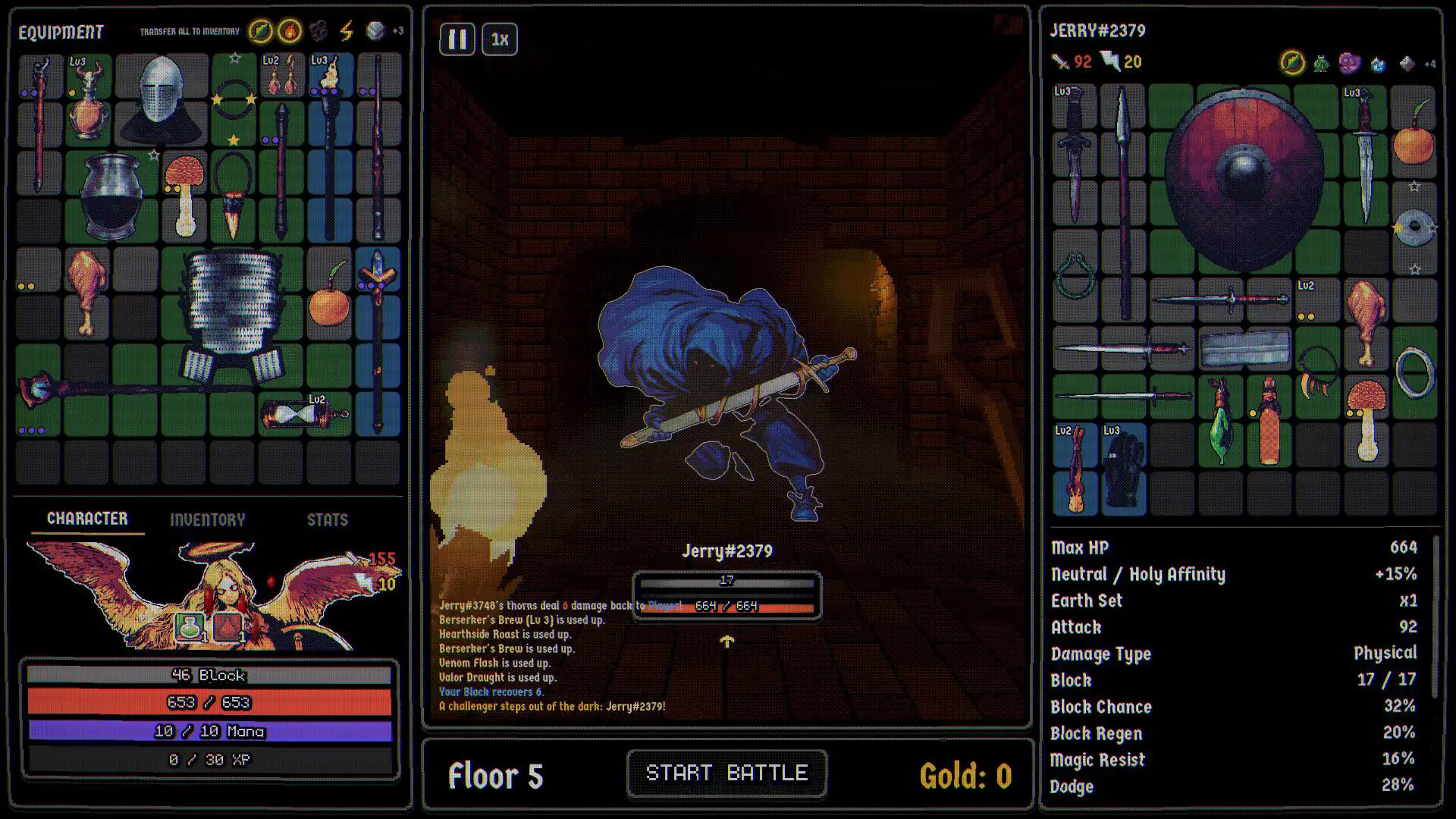
Dungeonbound does not use fixed equipment slots. Every item is a shaped piece on a backpack-style grid, and the official page is explicit that what it touches changes what it does. That single design choice turns every loot decision into a geometry problem.
It also means there is no universal “best item”. A legendary piece that occupies six cells and blocks two synergies can be worse than a common piece that completes a row and covers a rune. The question is not “how strong is this item?” It is “what does this item let the rest of my board do?”
Board schematic - not to scale
Sweep fires items in path order
Placement: items are shaped pieces; what a piece touches can change what it does.
Order: the sweep fires items as it passes, so trigger order is a packing decision.
Runes: 2x2 squares; the item covering most of a rune gets its power.
Space: leaving a merge lane open is often better than filling every cell.
The five layers of a board
A working board usually has five layers. You do not need all five on floor one, but by the middle of a run you should be able to point at each one.
1. An anchor
The item or tag your damage plan is built around. It might be a weapon, a status engine or a timed piece. The anchor determines which shops you care about and which tags you keep.
Without an anchor, every shop looks equally good and your gold spreads across five half-plans.
2. A defence layer
Block, dodge, resistances, healing or a combination. The important distinction is between avoiding damage and recovering from it:
- Block absorbs physical damage before health is lost. It is strongest against many small hits.
- Dodge avoids an attack entirely but can be lowered by Freeze.
- Magic Resist covers magic damage.
- Regen and lifesteal recover health over time. They are strongest in long fights.
- Thorns reflects damage, which punishes multi-hit attackers.
A board with only one layer eventually meets the floor that ignores it. The status guide explains which statuses bypass which assumptions.
3. A sustain layer
Sustain is not the same as defence. A big Block pool can absorb a hit; sustain is what gets the health bar back before the next one. The official item pool includes life steal, Regen, healing on trigger, potions and blessing effects.
The practical test: after a fight, did your health go up or down? If the answer is always down, you have defence but not sustain.
4. A space plan
A full board is a dead board. You need room for:
- a merge (two identical items become one higher-level item);
- a shrine reward;
- a potion or quest item;
- the next shop’s upgrade.
Fusion is the main pressure valve because it compresses two items into one footprint. A reviewer fused a seven- or eight-cell shield into a two-cell hybrid that still provided block every six seconds, which is the kind of trade that wins a floor. But fusion also consumes both parents and keeps their curses, so it is not free.
5. A trigger order
Attacks sweep a lap around the board and fire each item they pass. That means the order in which effects resolve is a packing decision, not a menu setting.
If an item grants Charge, Attack or a debuff, placing it early in the sweep lets later items benefit from it in the same cycle. If an item only helps after a status is applied, it wants to fire after the status source.
We do not have a public, exact sweep-path diagram for every board shape. The safe method is empirical: move one piece, watch the log, and check whether the buff lands before or after the payoff.
Tags act as sets - and the game may not tell you
Gear carries affinity tags. The official shop screenshot shows tag counters such as Earth 3, Wind 2, Arcane 1, Fire 1, Frost 1, Haunted 1, Holy 1, Undead 1. The rival panel shows set counts such as Lightning Set x2 and Wind Set x3.
The key detail, reported by a pre-release reviewer: a set is every item carrying the same tag, not a fixed collection of specific items. All your Metal gear counts as one set. The reviewer only figured this out in hour five because the game did not explain it.
If that behaviour holds at launch, it changes how you shop:
- A tag bonus is a board-wide commitment, not a two-item combo.
- Buying a third item of a tag can be worth more than buying a higher-rarity off-tag item.
- A shop with three items of one tag is a signal, even if none of them is a headline upgrade.
We mark this as community-observed because the official page does not spell out the set rule. The tag counters themselves are visible in official screenshots.
Affinity is a hidden multiplier
Each hero has affinity tags. The official Flame Knight panel shows Fire +15% and Metal +15%. A rival panel shows Undead / Frost +15%. An item that matches the hero’s affinity gets a bonus; an item that does not is just its base stats.
The reviewer’s measurement is the clearest illustration: a frost item did 39 damage without the affinity bonus and 47 with it. The item tooltip showed only the base number. That is a 20% difference from a system the UI did not surface clearly.
Practical rules:
- Treat the tooltip as a floor. If an item matches your affinity, assume it does more than the number shown.
- Do not mix three affinities on one board unless a relic or hero passive rewards it. You are paying full price for off-affinity pieces.
- Check the Affinity Forge. The Halloween update added a shrine that changes one of an item’s types to one of your hero’s types. That can turn a good off-affinity item into a good on-affinity item.
- Read the set counter after every purchase. The counter is the closest thing to a live affinity readout.
Runes: 2x2 real estate
Runes are not small trinkets. Since v0.1.50 they are 2x2 squares, and the item covering most of a rune receives its power. The update added 36 new runes, and the Codex has dedicated Runes and Gems tabs.
This creates a packing conflict: a 2x2 rune wants a large item on top of it, but large items are exactly what you might need to fuse to save space. The usual solutions:
- Put a large anchor item over the rune so the rune’s power scales your main engine.
- Use a 2x2 shield or armour piece that wants the space anyway.
- Do not cover a rune with four one-cell trinkets unless the rune’s effect is irrelevant to your plan.
The rune’s exact bonus varies. A screenshot shows a rune tooltip with “Each trigger: +10%” truncated; do not assume every rune is a damage multiplier. Read the tooltip before you build around it.
Timed items vs the sweep
Most items wait for the attack sweep. Timed items fire on their own clock instead. A green line charges vertically through the piece, and the item activates when the line fills.
The confirmed timed pieces from v0.1.18 are:
- Metronome Pendant
- Hourglass Band
- Pendulum Mace
- Tidewatch Helm
- Stormglass Charm
- Ember Clock
The rules that matter:
- Speed scales timed items. A v0.1.22 change made timed items speed up with the Speed stat; Speed 10 is the normal pace.
- Charge speeds them up. Thunderhead Greaves gain 1 Charge every 4 seconds.
- Slow and Stun hold them back. Stun also makes a stunned item hurt its owner when it fires.
- Timed items ignore the sweep order. They are a separate engine, so they can cover a gap in a sweep-based board - or compete with it for space.
A timed board is not automatically better. It is more predictable in one sense (you can count the seconds) and less interactive in another (you cannot reorder the sweep to set it up). Treat it as a second archetype, not an upgrade.
A repeatable packing method
When a new floor’s shop opens, do not start with the shiniest item. Use this order:
- Place the anchor. Put your main damage or status engine on the board first.
- Place the rune piece. Decide which item deserves the 2x2 rune before you fill the surrounding cells.
- Place the largest defensive piece. Shields and armour are the hardest shapes to fit later.
- Fill the adjacency slots. Add the pieces that want to touch the anchor, the rune item or the defensive piece.
- Leave a merge lane. Keep at least one open region large enough for a duplicate or a shrine reward.
- Run one fight and read the log. Check the top damage, top healing and the first three triggers. If the order is wrong, move one piece and repeat.
Pre-fight board audit
- Every cell either holds an item or is reserved for a specific upcoming piece.
- The rune is covered by the item you actually want to empower.
- At least one sustain source has triggered in the last fight.
- Your damage type matches the enemy’s weakness or your hero’s affinity.
- The board has room for a merge or a shrine reward.
- No item is locked behind an empty cell it cannot reach.
- The timed items are not being suppressed by Stun or Slow.
- You know which item is your first trigger and which is your win condition.
Five packing mistakes
- Filling every cell. A full board cannot accept a merge, a shrine item or a shop upgrade. Space is a resource.
- Chasing rarity over tags. A rare off-tag item can break a set that a common on-tag item would complete.
- Ignoring the rune. Covering a 2x2 rune with filler wastes a board-wide bonus.
- Placing the payoff before the setup. If the log shows your buff landing after the attack it was meant to boost, move the buffer earlier in the sweep.
- Fusing the anchor. The forge consumes parents. If an item is the reason the board works, merge a duplicate or wait.
What we still don’t know
- The exact board dimensions and unlock costs per hero.
- The complete sweep-path rules for every shape.
- Whether every tag has a tiered set bonus and what the thresholds are.
- Whether affinity bonuses stack with set bonuses additively or multiplicatively.
- The full rune list and the exact coverage rule for irregular shapes.
We will add a datamined board planner only if the grid dimensions and shapes can be verified. Until then, the fusion helper and the item database are the practical tools.
Sources & verification
Checked 2026-11-15- 01 Dungeonbound on Steam Official Store description, feature list, modes, system requirements, languages and release date.
- 02 Dungeonbound Item Update v0.1.18 Official Timed items, six named timed pieces, loadout row unlocks, leaderboard and rival inspection.
- 03 Bug Fix Update 0.1.22: Item Crash Fixed Official Timed items scale with Speed, rarity labels, set tooltips, rival viewer.
- 04 Dungeonbound v0.1.40 Update + Mac Build for demo Official The Grave, speed baseline, item balance, climb win condition, Mac demo build.
- 05 Dungeonbound 0.1.46: Halloween Update Official Pumpkin Head, Haunted items, co-op lobbies, Mythic relics, PvE-only climbs, status changes.
- 06 Dungeonbound v0.1.50: Potions, Runes & Late Game + 40k wishlists Official Rune rework, potion rules, new hero Jeiku, forged-item growth, fatigue, speed curve.
- 07 Dungeonbound v0.1.51 + 55k wishlists + 7 days until launch Official Pricing indication ($10-12), item shrines, fusion preview, Loaded Dice, Jeiku, QoL and fixes.
- 08 Dungeonbound Review: The Bag Does the Fighting Press Pre-release impressions of the demo, including affinity tooltips, tag sets, fusion space savings and fatigue.
- 09 Official Steam store screenshot: dungeon shop Official screenshot Shop stock, prices, reroll cost and tag counters.
- 10 Official Steam store screenshot: rival scout panel Official screenshot Rival board, affinity, set counts, block, dodge, crit and floor edge stats.
- 11 Official Steam store screenshot: combat and battle log Official screenshot Court Mage and Serpent Knot encounter, critical hit, burn and item trigger log.
Screenshots and patch notes reflect pre-release builds. Where the launch build differs, the source label tells you how much weight to give a claim.
Quick answers
FAQ
Does item placement matter in Dungeonbound? +
Yes. Items are shaped pieces on a grid, what they touch can change what they do, and attacks sweep around the board firing each item they pass. Placement affects both fit and trigger order.
What are sets in Dungeonbound? +
Sets are tag counts, not fixed item collections. Every item carrying the same tag counts toward that tag's set bonus. A reviewer discovered this in hour five because the game did not explain it clearly.
What does affinity do? +
A hero has affinity tags, and matching gear gains a bonus. An official screenshot shows +15% affinity; a reviewer measured a frost item at 39 damage without the bonus and 47 with it. The item tooltip may show only the base stat.
How do runes work? +
Runes are 2x2 board squares. The item covering most of a rune gets its power. Since v0.1.50 there are 36 new runes and the Codex has Runes and Gems tabs.
Why are some items on a timer? +
Timed items fire on their own clock instead of the board sweep. A green line charges through the piece. Charge speeds them up; Slow and Stun hold them back.
Keep reading